Sixty-eight dots
I built FaceToEquation over two days in November 2024, with a FastAPI backend and a Next.js front end. You upload a photo, and the first job is finding the face. dlib's face detector locates it, then its landmark model places 68 points on it: 17 along the jaw, 5 on each eyebrow, 9 on the nose, 6 on each eye and 20 around the lips.
Dots aren't equations yet. The fun part was deciding which kind of curve suits each part of a face.
A different curve for each part
| Feature | Curve |
|---|---|
| Jawline | Two cubic splines that meet at the chin |
| Eyebrows | Two quadratic Bézier curves that meet at the arch |
| Eyes | A rotated ellipse |
| Nose bridge | A natural cubic spline, with x as a function of y |
| Nose tip | A parabola |
| Lips | Bézier curves, with two quadratics for the Cupid's bow |
A quadratic Bézier curve is a blend of three control points as t goes from 0 to 1:
B(t) = (1−t)²P₀ + 2t(1−t)P₁ + t²P₂
The landmarks are known and t is spaced evenly along them, so the control points are the only unknowns and the problem is linear. Stack the blending terms into a matrix A, and least squares finds the best fit for x and y separately:
minp ‖Ap − x‖²
That turns half of one eyebrow into three pairs of numbers, which is the whole idea of the project:
P0 = (0.051,  0.089)
P1 = (0.098, -0.003)
P2 = (0.209,  0.019)
An eye is an ellipse with a center, two radii and a tilt θ, which an optimizer tunes to the six landmarks:
x = cx + a cos t cos θ − b sin t sin θ
y = cy + a cos t sin θ + b sin t cos θ
A jawline has too much going on for one curve, so a spline joins several cubic pieces end to end. Splitting it at the chin keeps that point sharp.
Why it looked like spaghetti
Most of the math was fine. What I got on screen was this:
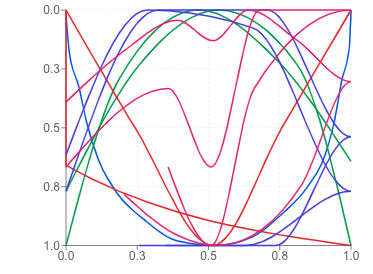 What the app drewThe same equation code, fixed around it
Rereading the code, there are three separate problems:
- Every feature was scaled on its own. Before fitting, each feature was stretched to fill a box from 0 to 1. An eye and a jaw ended up the same size in the same place, so the face lost all its proportions. Scaling once for the whole face fixes it.
- The front end misread the spline. The jaw's numbers are B-spline coefficients, but the chart code plugged them in as if they were an ordinary polynomial.
- The upper lip has too few points. This one is still in the drawing on the right, as the spike across the cheek. A cubic Bézier has four control points, and the code fits one to only two landmarks. That's more unknowns than equations, so least squares has endless perfect answers and returns the one closest to zero, which drags the curve toward the corner of the box.
I like that last one because the math did exactly what it promises. It found a perfect fit. I just hadn't given it enough information for a perfect fit to mean anything.